Understanding Kubernetes Load Balancing Services
- Nishadil
- November 07, 2026
- 0 Comments
- 3 minutes read
- 7 Views
- Save
- Follow Topic
A Practical Guide to Using LoadBalancer Services in Kubernetes
Learn how Kubernetes LoadBalancer services expose your apps, the difference between internal and external balancers, and step‑by‑step instructions to get a simple NGINX deployment online.
Kubernetes gives you a handful of ways to make a pod reachable from the outside world. The LoadBalancer service type is the one that most folks reach for when they need a public IP address that automatically spreads traffic across a set of pods.
At its core a LoadBalancer service asks the underlying cloud (or a compatible controller) to spin up a real load‑balancing instance – think AWS ELB, Google Cloud Load Balancing, or Azure Load Balancer. That instance gets a public (or private) IP, and Kubernetes wires the service’s ClusterIP to it. From that point on any request that lands on the IP is forwarded, according to health checks, to the healthy pods behind the service.
There are two broad flavors:
- External Load Balancer – meant for traffic coming from the internet. It usually gets a public DNS name or IP, and you’ll want firewall rules and TLS termination in place.
- Internal Load Balancer – only reachable from within your VPC or VNet. Perfect for micro‑services that talk to each other but shouldn’t be exposed publicly.
Kubernetes also ships other service types that sit somewhere else on the spectrum:
ClusterIP: the default, only reachable inside the cluster.NodePort: opens a static port on every node, useful for quick demos.ExternalName: a DNS alias to something outside the cluster.
Which cloud provider you run on matters because each one implements the LoadBalancer resource a bit differently. AWS can create an ALB or NLB depending on annotations, Google Cloud offers a regional HTTP(S) load balancer, and Azure gives you either a Layer‑4 Load Balancer or an Application Gateway for Layer‑7 routing. If you’re on‑prem or on a platform that doesn’t auto‑provision a balancer, you’ll need an ingress controller or a third‑party solution.
Below is a quick, hands‑on example that shows how to get an NGINX pod exposed via a LoadBalancer service. Feel free to copy‑paste, tweak the YAML, and watch the magic happen.
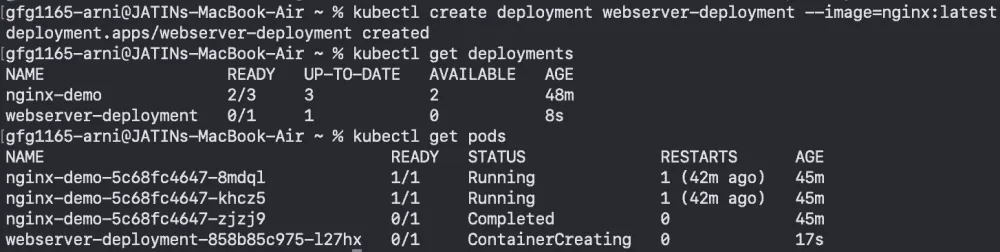
Step 1 – Create a Deployment (imperative).
kubectl create deployment webserver-deployment --image=nginx:latest
kubectl get pods -w
Or, if you prefer declarative YAML, save the following as loadBalancerDeployment.yml and apply it:
apiVersion: apps/v1
kind: Deployment
metadata:
  name: deployment-nginx
  labels:
    app: nginx-application
spec:
  replicas: 1
  selector:
    matchLabels:
      app: nginx-application
  template:
    metadata:
      labels:
        app: nginx-application
    spec:
      containers:
      - name: nginx-container
        image: nginx:latest
        ports:
        - containerPort: 80
Run kubectl apply -f loadBalancerDeployment.yml and verify the pod is running.
Step 2 – Create the LoadBalancer Service.
apiVersion: v1
kind: Service
metadata:
  name: service-nginx
spec:
  type: LoadBalancer
  selector:
    app: nginx-application
  ports:
  - port: 80
    targetPort: 80
Apply it with kubectl apply -f loadBalancerService.yml. After a few seconds (or minutes on some clouds) kubectl get svc service-nginx will show an external IP address. Point your browser there and you should see the default NGINX welcome page.
That’s really it. From here you can add health‑check annotations, enable TLS, or switch the service to an internal load balancer by adding the appropriate cloud‑specific annotation (for example, service.beta.kubernetes.io/aws-load-balancer-internal: "true" on AWS).
Remember, the LoadBalancer service is just one piece of the puzzle. For complex routing, path‑based rules, or canary releases you’ll probably reach for an Ingress resource backed by a controller that talks to the same cloud load balancer under the hood.
- India
- News
- Technology
- TechnologyNews
- Commerce
- Upsc
- Mathematics
- School
- AndroidDevelopment
- Tutorial
- Programming
- Java
- DataScience
- Kubernetes
- Nodejs
- Service
- Cbse
- Python
- Javascript
- SystemDesign
- Php
- Aptitude
- Placement
- CloudProvider
- Ingress
- LoadBalancer
- CompetitiveProgramming
- CodingContests
- AzureKubernetesServices
- InternalLoadBalancer
- ExternalLoadBalancer
- NginxDeployment
- YamlManifest
Editorial note: Nishadil may use AI assistance for news drafting and formatting. Readers can report issues from this page, and material corrections are reviewed under our editorial standards.