How to Watch Videos on Apple CarPlay (When Your Car Is Parked)
- Nishadil
- November 08, 2026
- 0 Comments
- 3 minutes read
- 13 Views
- Save
- Follow Topic
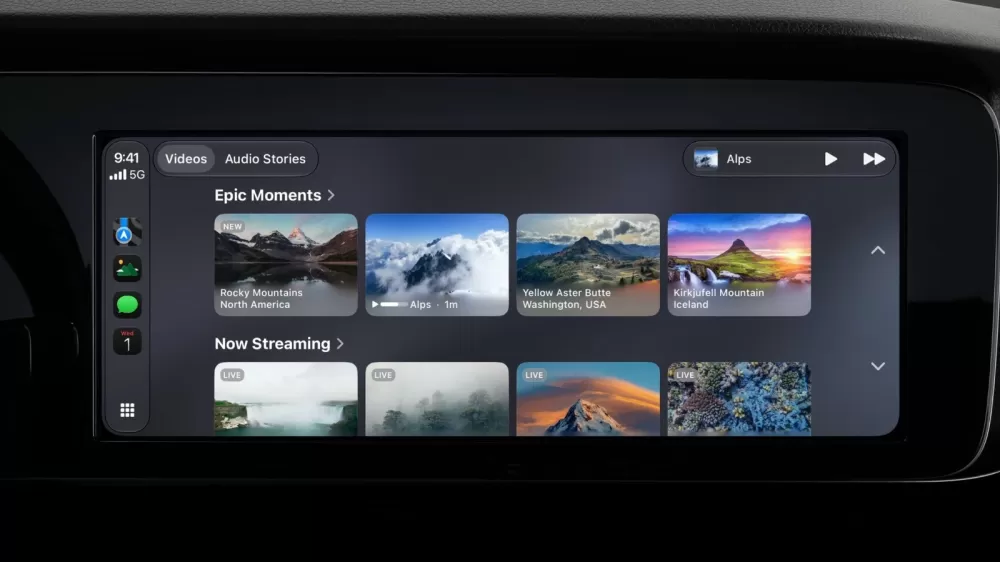
Step‑by‑step guide to streaming video on CarPlay – native apps, AirPlay tricks, and aftermarket work‑arounds
Apple finally lets you play videos on CarPlay while parked. Learn which apps work, how to use AirPlay, and what to do if your car isn’t compatible.
If you’ve ever wished you could catch up on a Netflix episode during a coffee break at the drive‑through, you’re not alone. Apple’s latest iOS 27 update actually makes that possible – but only when the car’s sitting still and the right software is in place.
First things first: you need a car that can show video. Not every dashboard can handle it. Apple insists the screen be at least 1920 × 1080 pixels, support the HEVC codec and have 4 GB of RAM. In plain English, older infotainment units simply won’t cut it. There’s no official list of compatible makes, so the only way to know is to try.
Assuming your ride passes the hardware test, the next step is the app. A handful of video‑centric apps have already been updated for CarPlay – think Apple TV + and a few niche streaming services. If one of those shows up on your CarPlay home screen, just tap it and you’re good to go. The interface mirrors what you see on the phone, and when you start driving the system automatically falls back to audio‑only, which is a nice safety net.
What if your favorite app – say YouTube or Netflix – isn’t on the CarPlay roster yet? No problem, thanks to AirPlay. Connect your iPhone to CarPlay as usual, launch the video in the app on your phone, then hit the AirPlay icon and pick the CarPlay device from the list. The video will pop onto the car’s display, and you’ll still have playback controls on both screens. Just remember: the car must be parked, otherwise the video won’t play.
Don’t forget to keep your iPhone updated. Native CarPlay video support lands with iOS 27, while AirPlay to CarPlay needs at least iOS 26.4. Open Settings → General → Software Update and make sure you’re on the latest version. If you have an iPhone 11 or newer, you’re covered.
Still hitting a dead end? It might be the car’s firmware. Some manufacturers haven’t added the “video‑in‑car” flag that tells CarPlay it’s safe to show video while stationary. In those cases, a third‑party dongle can fill the gap. Brands like Carlinkit and Ottocast sell Android‑based “AI boxes” that plug into the infotainment port and let you run Netflix, YouTube or virtually any app. These devices bypass Apple’s parked‑only restriction, so use them responsibly – watching video on a moving vehicle is both illegal and dangerous in many jurisdictions.
Bottom line: watching videos on CarPlay is now a realistic thing, but it hinges on three things – a compatible screen, the right app (or AirPlay), and a car that signals it’s parked. If all three line up, you can finally enjoy that long‑awaited episode without having to pull out your phone and risk a glance‑away violation.
Editorial note: Nishadil may use AI assistance for news drafting and formatting. Readers can report issues from this page, and material corrections are reviewed under our editorial standards.