Reimagining Your Old Android Phone: The PC Accessory You Never Knew You Needed
- Nishadil
- November 13, 2026
- 0 Comments
- 4 minutes read
- 0 Views
- Save
- Follow Topic
Beyond the Drawer: How Your Dusty Android Can Become Your Next Favorite PC Companion
Don't let that old Android phone gather dust in a drawer! Discover how readily available tools and a touch of ingenuity can transform it into a versatile desktop PC or a powerful, custom accessory for your current setup.
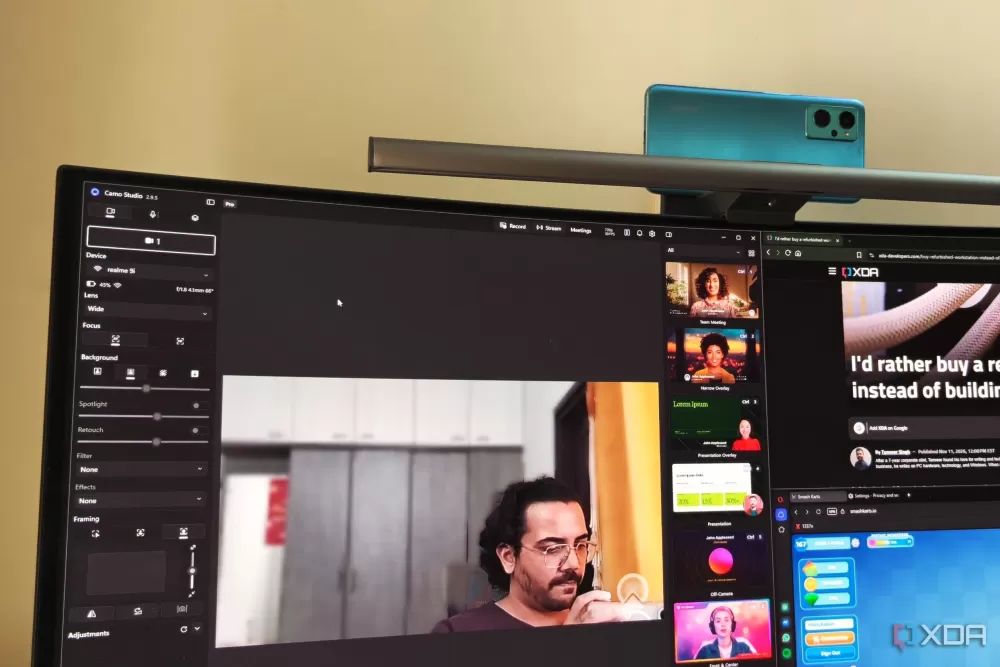
We've all been there, right? That old Android phone, still perfectly functional perhaps, but long since replaced by something newer and shinier, now relegated to the back of a drawer. It feels a bit wasteful, doesn't it? But what if I told you that dusty gadget holds untapped potential, capable of becoming a surprisingly useful desktop PC or a unique accessory for your existing computer setup? It's not just a pipe dream; people are actively turning these forgotten devices into powerful, flexible tools.
So, how exactly does one pull off this kind of tech magic? Well, there are a few compelling avenues. For the true tinkerer, installing a lightweight Linux desktop environment is a popular choice. Tools like Termux, combined with Termux X11, can essentially turn your phone into a Linux machine, ready for coding, light office tasks, or even just web browsing. Imagine having a portable, fully functional Linux environment in your pocket!
But maybe Linux isn't your jam, or your phone isn't a Samsung. No problem! There's an open-source tool called Android Dex that allows you to create a desktop-style interface on a wide array of Android devices. This is about bringing that familiar, multi-window desktop experience to virtually any Android phone when connected to an external monitor, keyboard, and mouse. It’s pretty neat to see.
Now, if you do happen to own a compatible Samsung device, you're already halfway there thanks to Samsung DeX. This built-in feature instantly transforms your phone into a desktop-like environment when docked or connected to an external display. It's seamless, powerful, and truly showcases the potential of mobile hardware. And for those who need a taste of Windows, some folks are even using solutions like Chrome Remote Desktop to effectively emulate a Windows PC experience, turning their Android into a convenient access point.
It's fascinating to see what devices people are breathing new life into. We're talking about phones as old as a seven-year-old Samsung Galaxy A70, an eight-year-old Galaxy S9, and even generic Vivo phones! This isn't just for flagship powerhouses; many older devices have enough grunt for these tasks. Plus, it's not just about the phone itself; sometimes, other small boards like a Raspberry Pi 3 even get involved, acting as wireless display receivers to enhance the experience with tools like SCRCPY.
And what can these repurposed devices actually do? The list is surprisingly robust. Beyond basic web browsing and email, users are tackling coding projects, handling office tasks, and even delving into gaming. Think NES, PSP, and even PS2 emulation, all running on your old phone! You can access Android apps in resizable windows, which, honestly, is a game-changer for multitasking. It’s not just a novelty; it’s genuinely useful.
Of course, it's not all sunshine and roses, right? There are always a few considerations. Pushing an old phone hard can lead to thermal challenges, so keeping an eye on temperatures is wise. Power limitations are another factor; sustained use will definitely mean staying plugged in, which can affect long-term battery longevity. And while performance is often surprisingly good for everyday tasks, don't expect it to replace your high-end gaming rig or workstation. For advanced projects, like using your phone for PC RAM or swap via USB, latency can be a real hurdle. But even with these quirks, the sheer potential is undeniable.
Ultimately, repurposing an old Android phone is more than just a tech project; it's a statement against planned obsolescence. It's about getting more out of the hardware you already own and exploring new ways to integrate mobile technology into your desktop workflow. So, before you toss that old phone into a box forever, consider giving it a second chance. You might just create the PC accessory you never knew you always wanted.
Editorial note: Nishadil may use AI assistance for news drafting and formatting. Readers can report issues from this page, and material corrections are reviewed under our editorial standards.